

Search nearby and along your way
Explore your surroundings or look at another region. Assess not only proximity but also suitability for the direction you are heading.
Find charging stations near you and along your route. Compare options with connector, power and operator filters, and save your favorites in eBattery.
Whether in daily use or on a long road: on the eBattery map you can see the charging points around you or in the region you are heading to. Narrow the list by your vehicle's connector, the power you need and your preferred operator.
In the station details, review the location, connectors and the price or status information coming from the source. Add the point that suits you to your favorites or include it in your trip plan. Real-time availability is shown on the networks that provide this data.
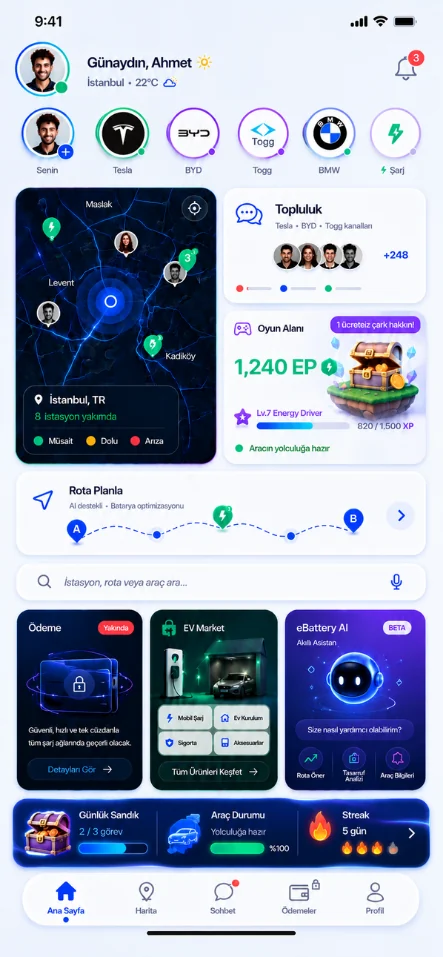
Explore your surroundings or look at another region. Assess not only proximity but also suitability for the direction you are heading.
Choose stations that match your vehicle's connector. Compare AC and DC charging options according to your needs.

See availability information at stations with a data connection. Take the last update and the scope of the information into account.

Save stations near your home, your work and your frequent routes. Don't search from scratch every time.

Treat the charging point you choose as a route decision. Consider your battery level and your arrival needs together.

Explore the surroundings in standard and satellite view. Complete your approach to the station using location information.
Before the number of stations, see how well it fits your vehicle and trip.
Your connector and power needs.
Your region and operator preferences.
Location, access and current information.
Save it to your favorites or include it in your route.
Even if a charging point is nearby, its connector, power or access conditions may not suit your needs. The vehicle profile and filters narrow down the options based on how you use your vehicle. That way you go from a crowded map to a list of stations you can actually evaluate.
You can review the station detail, location and the current information provided in the same context. Adding the points you use daily to your favorites and setting alternative stops for your trip reduces the need to research from scratch each time.
No. Being listed on the map and real-time availability are different pieces of information. Real-time status is provided through the connection of the relevant operator or data provider.
Unified charging and payment is a separate service that will open in stages with supported operators. Seeing a station on the map does not mean in-app payment is enabled at that station.
Factors such as vehicle capacity, battery level and temperature also play a part. The maximum power listed at the station is not the power you will get throughout the whole charge.
Discover stations, plan charging breaks and stay connected with drivers. eBattery for iOS and Android.